You just spent three hours making flashcards from your lecture notes. Now it's 11pm, you're exhausted, and you haven't actually studied yet.
Sound familiar? That's the dirty secret of traditional flashcard creation: building the deck is its own studying session, one that doesn't really teach you anything. You're just copying, not learning. And with a full course load, you don't have that kind of time to waste.
That's where an AI flashcard maker changes the game. Instead of spending hours manually building decks, you upload your notes, PDFs, slides, or textbook pages, and the AI does the heavy lifting in seconds. You get to skip straight to the part that actually builds knowledge: testing yourself.
In this guide, you'll learn exactly how AI flashcard makers work, what separates a great tool from a mediocre one, how to get maximum retention from your decks, and who benefits most. Whether you're a premed student drowning in anatomy, a language learner building vocabulary, or just someone trying to study smarter, this is for you.
TL;DR
- AI flashcard makers auto-generate question-and-answer cards from your notes, PDFs, slides, or videos in seconds, so you skip card creation and go straight to studying.
- Flashcards work because of active recall (testing yourself) and spaced repetition (reviewing at optimal intervals), two of the most scientifically validated study methods.
- Look for tools with PDF/image/video support, built-in spaced repetition, and easy editing so you can customize AI-generated cards to match your syllabus.
- Always review and edit your generated deck before studying. Treat the AI output as a strong first draft, not a finished product.
- Best for med students, MCAT prep, and language learners who need to process large volumes of content efficiently.
What Is an AI Flashcard Maker?
An AI flashcard maker is a tool that automatically generates question-and-answer cards from your source material. You provide the content, such as lecture notes, a PDF, a YouTube video, or a photo of your textbook, and the AI analyzes the material, identifies key concepts, and outputs a ready-to-study flashcard deck.
How AI Turns Your Notes Into Flashcards
The process is simpler than it sounds. Most modern AI flashcard tools use large language models to read and understand your content the same way a smart study partner would. The AI identifies definitions, key terms, cause-and-effect relationships, and conceptual frameworks, then structures each one into a question-and-answer format.
For example, if you upload a biology chapter on cell division, the AI won't just copy sentences verbatim. It'll generate targeted cards like "What triggers the G1 checkpoint in mitosis?", the kind of question that actually tests your understanding rather than your ability to recognize a phrase.
The whole process typically takes under 30 seconds, regardless of how long your source document is.
AI Flashcard Maker vs. Doing It Manually — What's the Real Difference?
Making flashcards by hand involves reading the material, identifying what's important, rephrasing it into a question, writing the card, and then organizing your deck. That’s a multi-step cognitive process, and while it has some learning value, research consistently shows that the retrieval phase (actually testing yourself) is what builds durable memory.
When AI handles the creation step, you free up all of your study time for retrieval practice. You go from spending 70% of your time making cards and 30% studying them, to spending 100% of your time actually learning.
Why Flashcards Work: The Science Behind It
Before diving into features, it's worth understanding why flashcards are such a powerful study tool. The answer comes down to two principles that every student should know.
The Forgetting Curve and Why It Matters for Exam Prep
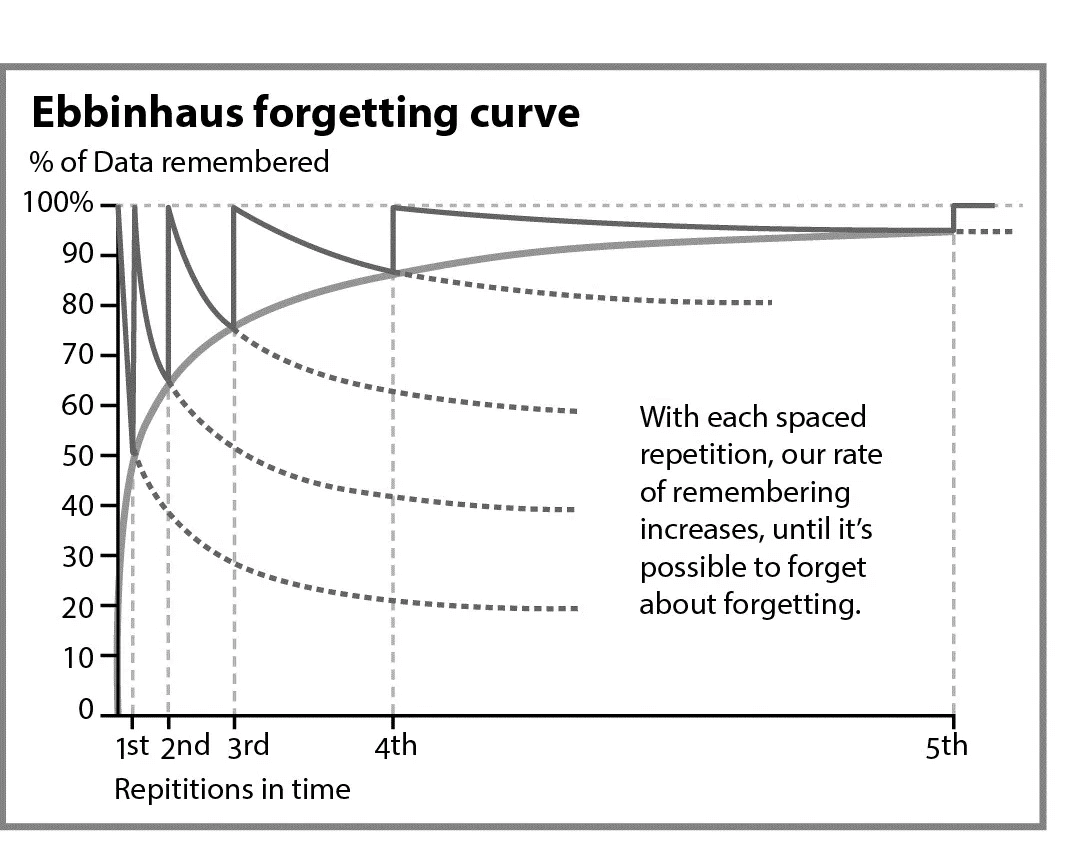
In the 1880s, German psychologist Hermann Ebbinghaus discovered something alarming: without reinforcement, the brain forgets up to 50% of new information within an hour, and roughly 70% within 24 hours. By the end of the week, most students retain only about 25% of what they learned in lecture.
This is called the forgetting curve, and it's why cramming the night before an exam feels productive but doesn't actually translate to long-term retention. You're working against your brain's natural tendency to deprioritize information that isn't frequently revisited.
Flashcards work precisely because they interrupt this forgetting process. Every time you test yourself on a card, you're forcing your brain to retrieve that memory, which strengthens the neural pathway associated with it. Each retrieval makes the memory more durable and the next review less urgent.
How Active Recall and Spaced Repetition Supercharge Flashcard Studying
The two mechanisms that make flashcards so effective are active recall and spaced repetition.
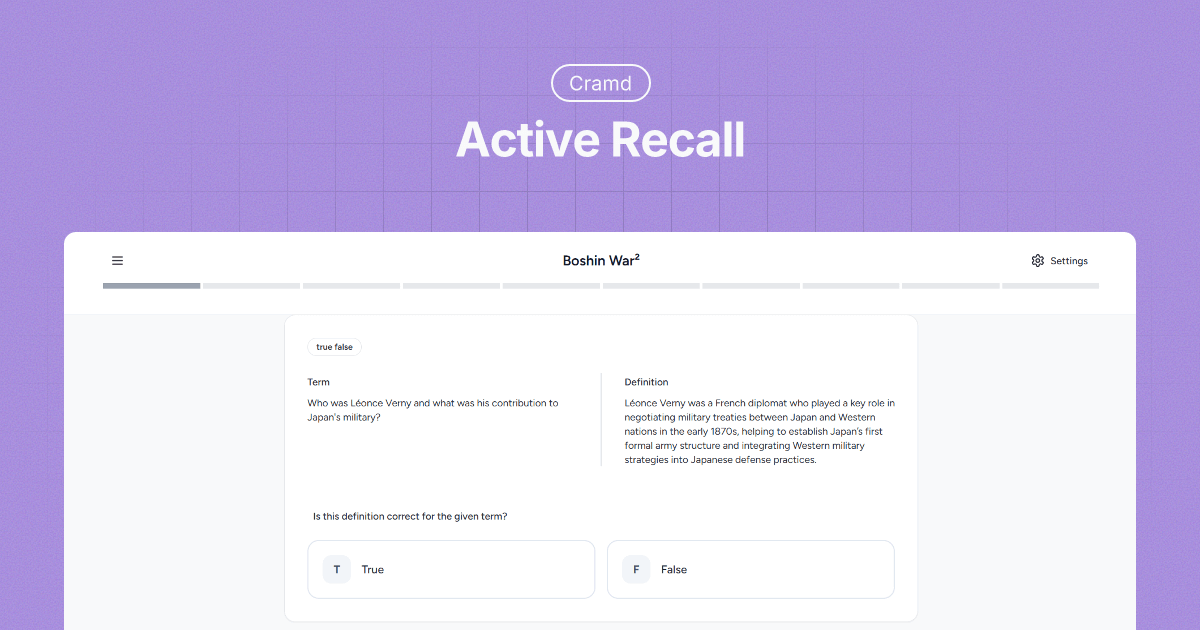
Active recall means retrieving information from memory without looking at your notes — exactly what happens when you flip a flashcard. A landmark study published in Science by Karpicke and Roediger (2008) showed that retrieval practice dramatically outperforms re-reading as a study strategy, even when total study time is the same.
Spaced repetition is the practice of reviewing cards at increasingly longer intervals — seeing a new card after one day, then three days, then a week, then a month. A 2025 study in ScienceDirect found that students who combined both methods significantly outperformed those using traditional re-reading and rote memorization. A PMC study on undergraduate medical students found that students using spaced repetition flashcards scored an average of 16.24/20 on post-tests, compared to 11.89/20 for those using traditional study methods, a statistically significant difference.
The takeaway: flashcards aren't just a convenient format. They're one of the most scientifically validated ways to study.
What Features Should You Look For in an AI Flashcard Maker?
Not every AI flashcard tool is built the same. Here's what actually matters.
Input Formats: PDFs, Slides, Text, Video, Images
The best AI flashcard makers can handle whatever you throw at them. Look for support for:
- PDFs — for textbooks, papers, and lecture slides exported as PDFs
- Text paste — for copying notes directly from Google Docs or Notion
- Images and photos — for handwritten notes or whiteboard captures
- Video — for processing recorded lectures or YouTube explainers
Cramd's PDF summarizer lets you upload any PDF and convert it to smart flashcards in under 30 seconds with no manual copying needed. The broader your input options, the less friction in your study workflow.
Spaced Repetition Built-In (vs. Manually Scheduling Reviews)
Some tools generate the cards and stop there. The best ones also include a built-in spaced repetition system (SRS) that schedules your reviews automatically. Instead of guessing when to re-study a deck, the algorithm tracks which cards you got right, which you struggled with, and serves them back at the optimal moment for memory consolidation.
If you have to manually decide when to review a deck, you'll either under-review (and forget) or over-review (and waste time on cards you already know). Built-in SRS removes that guesswork entirely.
Customization, Editing, and Quality Control
AI isn't perfect. Sometimes it generates cards that are too broad, too narrow, or worded in a way that doesn't match how your professor teaches the concept. A good AI flashcard maker makes it easy to edit, delete, and add cards so you stay in control of your deck quality.
Never accept a generated deck without reviewing it. The AI gives you a 90%-there starting point, your job is to customize the remaining 10%.
How to Use an AI Flashcard Maker Step by Step
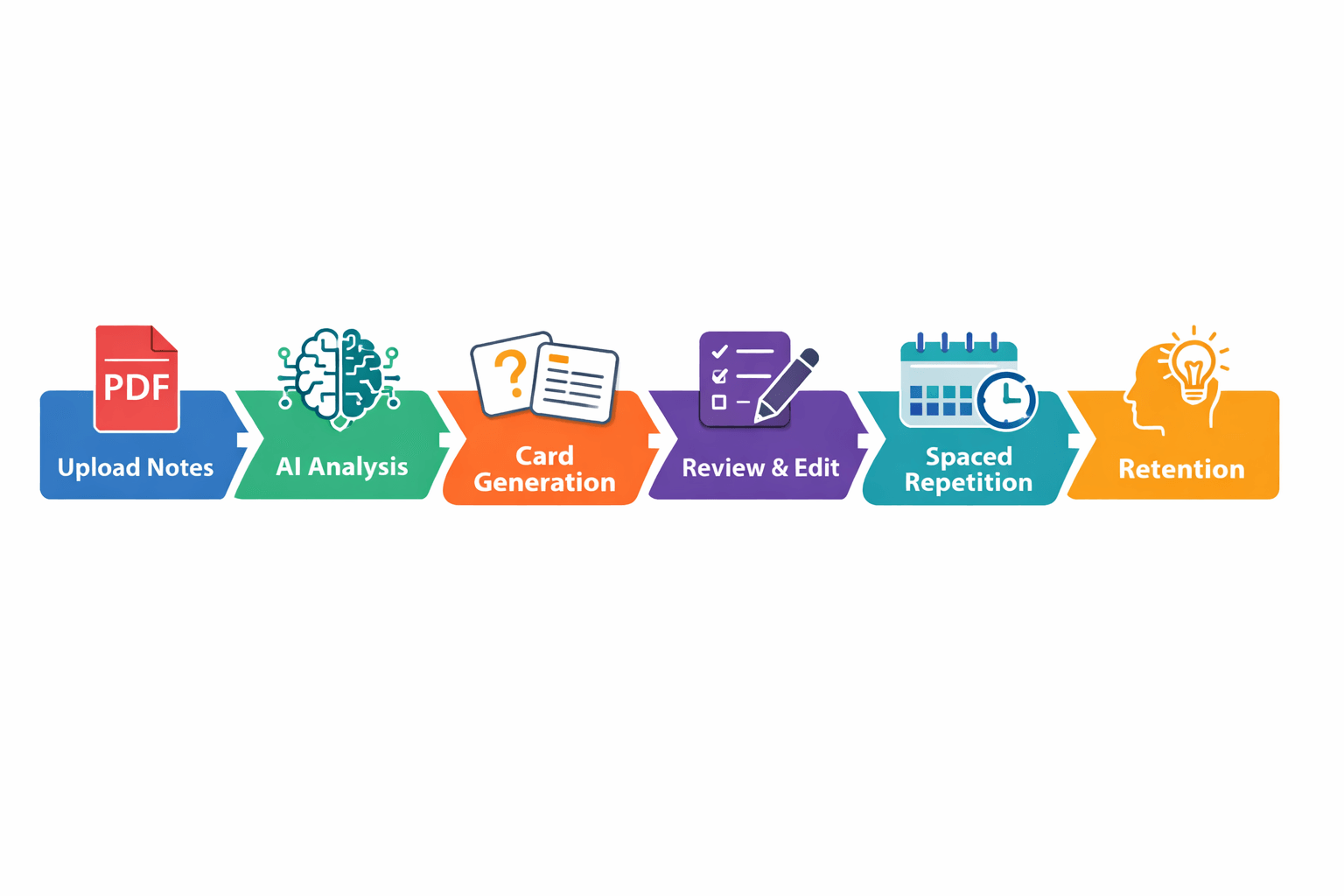
Here's a practical workflow for getting the most out of any AI flashcard tool.
Step 1: Prepare Your Source Material
Quality in, quality out. The cleaner your input, the better your flashcards. Before uploading, quickly scan your notes and highlight or bold the most important terms, definitions, and concepts. This gives the AI stronger signals about what to prioritize.
If you're uploading a full textbook chapter, consider trimming it to the sections your professor actually covered in lecture. More material doesn't mean better cards — it often means more noise.
Step 2: Upload and Generate
Upload your material and let the AI work. Most tools take 10–30 seconds. For a thorough look at how to make effective flashcards, both manually and with AI, check out Cramd's breakdown.
Use this time to grab a glass of water (seriously). The mental shift from "I'm still prepping" to "I'm about to study" matters.
Step 3: Review, Edit, and Cull
Go through every generated card before your first study session. Remove duplicates, fix confusingly worded questions, and flag any cards that test recall of trivia rather than understanding of concepts. You want cards that challenge you to think, not just pattern-match.
A deck of 40 high-quality cards beats a deck of 100 mediocre ones every time.
Step 4: Study With Intention (Don't Just Flip Cards)
The single biggest mistake students make with flashcards is passive flipping, glancing at the question, immediately flipping to the answer without really trying to recall, and moving on. This creates the illusion of studying without the actual memory consolidation.
Force yourself to generate an answer before you flip. Even if you're wrong, the attempted retrieval strengthens the memory trace. Rate each card honestly (easy/medium/hard), and let the spaced repetition algorithm do the rest.
Who Gets the Most Out of AI Flashcard Makers?
Are AI Flashcard Makers Good for Premed and MCAT Students?
Absolutely, and arguably this is where they shine most. Premed students are dealing with enormous volumes of content across biochemistry, anatomy, pharmacology, and more. The PMC research on spaced repetition in medical education shows consistent, statistically significant improvements in test scores for students who use digital flashcard systems vs. traditional methods.
For MCAT prep specifically, the combination of AI-generated decks and built-in spaced repetition means you can systematically work through thousands of concepts without manually building or organizing a single card. For more strategies, check out Cramd's guide on the best method to study for the MCAT.
Can You Use AI Flashcard Makers for Language Learning?
Yes, and they're exceptionally well-suited for it. Vocabulary acquisition is one of the most repetition-dependent learning tasks that exists, which means the spaced repetition algorithm does its best work here. Upload vocab lists, grammar tables, or even excerpts from texts in your target language, and the AI can generate question-and-answer pairs for translation, conjugation, and usage.
The key is reviewing consistently over time rather than bingeing on cards before a test. Language learning rewards daily short sessions far more than marathon cram sessions.
Are Free AI Flashcard Makers Actually Worth It?
Depends on what "free" means for the tool in question. Some genuinely offer a useful free tier — enough to test the tool and study one or two subjects at no cost. Others gate the most important features (spaced repetition, unlimited uploads, PDF support) behind a paywall immediately.
For most students, the right approach is to start with a generous free tier, see if the AI output quality meets your needs, and upgrade only if you're going to use the tool consistently across multiple classes. Cramd's AI flashcard generator is a strong starting point — you can try it free and generate cards from your own notes right away.
Common Mistakes Students Make With AI Flashcard Generators
Trusting the AI Blindly Without Reviewing Cards
AI flashcard generators are powerful, but they don't know your syllabus. They don't know which topics your professor emphasized in lecture, which definitions she uses over the textbook's version, or which concepts are likely to show up on your specific exam.
Always do a pass through the generated deck before you start studying. Treat the AI as a first draft, not a finished product. This review step takes five minutes and dramatically improves the quality of your study session.
Passive Flipping Instead of Active Recall
This bears repeating: looking at a card and immediately flipping it is not studying. It's browsing. The memory benefit of flashcards comes from effortful retrieval, the act of struggling to produce the answer before you see it.
If you're breezing through a deck too quickly, slow down. Cover the answer. Think. Only then flip and check.
Overloading Decks and Burning Out
The temptation with AI generators is to create massive decks, with your entire textbook chapter distilled into 200 cards. Resist this. Large decks are cognitively overwhelming and make consistent review feel like a chore.
Aim for focused decks of 30 to 60 cards per topic, reviewed in 15 to 20 minute sessions. Daily short sessions beat weekend marathons. Your brain consolidates memory during sleep, so spreading reviews across multiple days, rather than multiple hours in one sitting, is what actually makes knowledge stick.
Start Smarter, Not Harder
AI flashcard makers are one of the most practical study upgrades available to students in 2026. They eliminate the time sink of manual card creation, let you put the science of active recall and spaced repetition to work immediately, and free you up to focus on what actually moves the needle: testing yourself consistently over time.
The key is using them with intention. Generate smart decks, review and edit them before you start, and study actively rather than passively. Do that, and you'll spend less time studying while retaining significantly more.
If you want to put this into practice right now, Cramd's AI flashcard generator turns your notes, PDFs, and textbook pages into study-ready decks in seconds. Try it free →
Frequently Asked Questions (FAQ)
Related reading: